# Bookmarked: Hotkeys, Workflows, and a Bit of Elbow Grease: Window Management in Alfred aka resizer - my window management workflow with Alfred

- Author: @gurupanguji
- Date: 2025-05-21
- URL: https://gurupanguji.com/blog/2025/05/21/hotkeys-workflows-and-a-bit-of-elbow-grease-window-management-in-alfred-aka-resizer-my-window-management-workflow-with-alfred/
- Categories: link, technology
- Tags: 1, alfred, mac, os-x, resizer, window-management, workflow

---


<!-- wp:paragraph -->
<p>I got a lot of feedback about my move back to alfred. The #1 question was, "But what about window management?!" Fair point — it’s a <a href="https://manual.raycast.com/window-management" target="_blank" rel="noopener" title="">baked-in feature in Raycast</a> and works great. But with Alfred 5+ and its automation tasks, resizing windows is just one (very simple) workflow away.However, with the automation tasks support in Alfred 5+, resizing windows is one simple workflow away in Alfred too. </p>
<!-- /wp:paragraph -->

<!-- wp:paragraph -->
<p>I even recently <a href="https://www.youtube.com/watch?v=DBifQv9AYhc&amp;t=130s" target="_blank" rel="noopener" title="">saw a video from Josean Martinez</a> that talks about how they use raycast for window management. Solid stuff. However, if you are team Alfred, here's how you build your own custom resize workflow: </p>
<!-- /wp:paragraph -->

<!-- wp:heading -->
<h2 class="wp-block-heading">🛠️ How to Build a Window Resizer in Alfred</h2>
<!-- /wp:heading -->

<!-- wp:list {"ordered":true} -->
<ol class="wp-block-list"><!-- wp:list-item -->
<li>Open Alfred Preferences > Workflows</li>
<!-- /wp:list-item -->

<!-- wp:list-item -->
<li>Create a new workflow</li>
<!-- /wp:list-item -->

<!-- wp:list-item -->
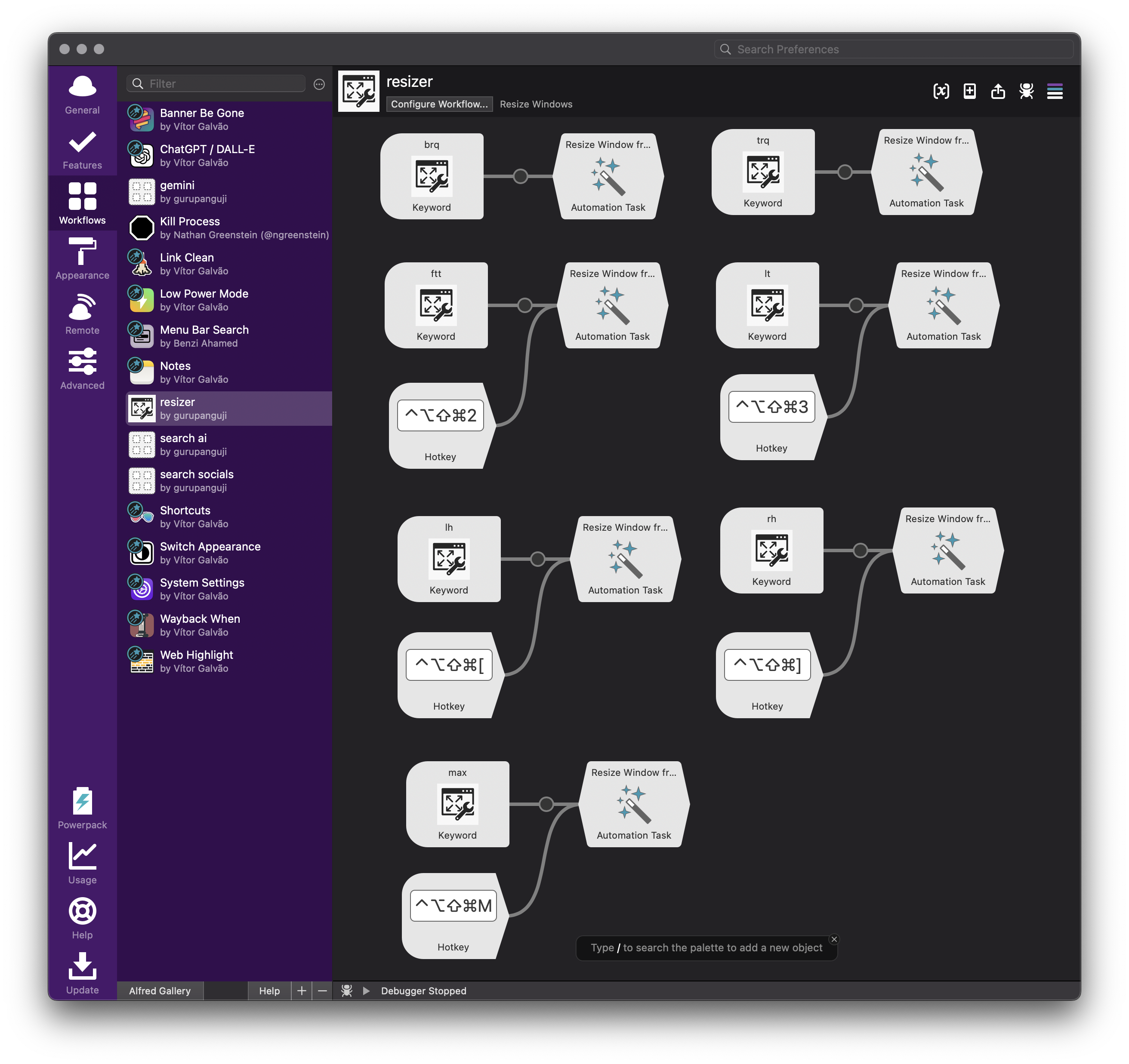
<li>Add a Keyword input block. Choose a keyword for each window action. I use:</li>
<!-- /wp:list-item --></ol>
<!-- /wp:list -->

<!-- wp:table -->
<figure class="wp-block-table"><table class="has-fixed-layout"><tbody><tr><td><strong>Keyword</strong></td><td><strong>Meaning</strong></td></tr><tr><td>lh</td><td>Left Half</td></tr><tr><td>rh</td><td>Right Half</td></tr><tr><td>ftt</td><td>First two thirds (from left)</td></tr><tr><td>lt</td><td>Last thirds (from left)</td></tr><tr><td>brq</td><td>Bottom Right Quarter</td></tr><tr><td>trq</td><td>Top Right Quarter</td></tr><tr><td>M</td><td>Maximize</td></tr></tbody></table></figure>
<!-- /wp:table -->

<!-- wp:paragraph -->
<p>4. If you're a shortcut junkie like me, hook up some Hotkeys to each one:</p>
<!-- /wp:paragraph -->

<!-- wp:table -->
<figure class="wp-block-table"><table class="has-fixed-layout"><tbody><tr><td><strong>Keyword</strong></td><td><strong>Hotkey</strong></td></tr><tr><td>lh</td><td><span style="caret-color: rgb(0, 0, 0); color: rgb(0, 0, 0); font-family: -webkit-standard; font-size: medium; white-space: normal;">✦</span>[</td></tr><tr><td>rh</td><td><span style="caret-color: rgb(0, 0, 0); color: rgb(0, 0, 0); font-family: -webkit-standard; font-size: medium; white-space: normal;">✦</span>]</td></tr><tr><td>ftt</td><td><span style="caret-color: rgb(0, 0, 0); color: rgb(0, 0, 0); font-family: -webkit-standard; font-size: medium; white-space: normal;">✦</span>2</td></tr><tr><td>lt</td><td><span style="caret-color: rgb(0, 0, 0); color: rgb(0, 0, 0); font-family: -webkit-standard; font-size: medium; white-space: normal;">✦</span>3</td></tr><tr><td>max</td><td><span style="caret-color: rgb(0, 0, 0); color: rgb(0, 0, 0); font-family: -webkit-standard; font-size: medium; white-space: normal;">✦</span>M</td></tr><tr><td></td><td></td></tr></tbody></table></figure>
<!-- /wp:table -->

<!-- wp:paragraph -->
<p>5. For each, add an Automation Task > Window Management, choose your desired action, and connect the nodes. Boom, you're done!</p>
<!-- /wp:paragraph -->

<!-- wp:paragraph -->
<p>Here's what the final workflow might look like</p>
<!-- /wp:paragraph -->

<!-- wp:image {"id":10666,"sizeSlug":"large","linkDestination":"media"} -->
<figure class="wp-block-image size-large"><a href="/assets/images/blog/Screenshot-2025-05-17-at-11.50.59.png"><img src="/assets/images/blog/Screenshot-2025-05-17-at-11.50.59-1024x965.png" alt="" class="wp-image-10666"/></a></figure>
<!-- /wp:image -->

<!-- wp:paragraph -->
<p>Happy resizing, and welcome back to the Alfred side!</p>
<!-- /wp:paragraph -->
