# Vertical tabs and Chrome MCP superpowered with the release of Chrome 146

- Author: @gurupanguji
- Date: 2026-03-14
- URL: https://gurupanguji.com/blog/2026/03/14/vertical-tabs-and-chrome-mcp-superpowered-with-the-release-of-chrome-146/
- Categories: essay, ai
- Tags: anthropic, chrome, claude, codex, dev-tools, gemini-cli, google, llm, mcp, web

---


<!-- wp:paragraph -->
<p>With the release of Chrome 146, there are 2 things you should be aware of:</p>
<!-- /wp:paragraph -->

<!-- wp:image {"id":18016,"sizeSlug":"large","linkDestination":"media"} -->
<figure class="wp-block-image size-large"><a href="/assets/images/blog/Screenshot-2026-03-14-at-08.21.38.png"><img src="/assets/images/blog/Screenshot-2026-03-14-at-08.21.38-1024x662.png" alt="" class="wp-image-18016"/></a></figure>
<!-- /wp:image -->

<!-- wp:paragraph -->
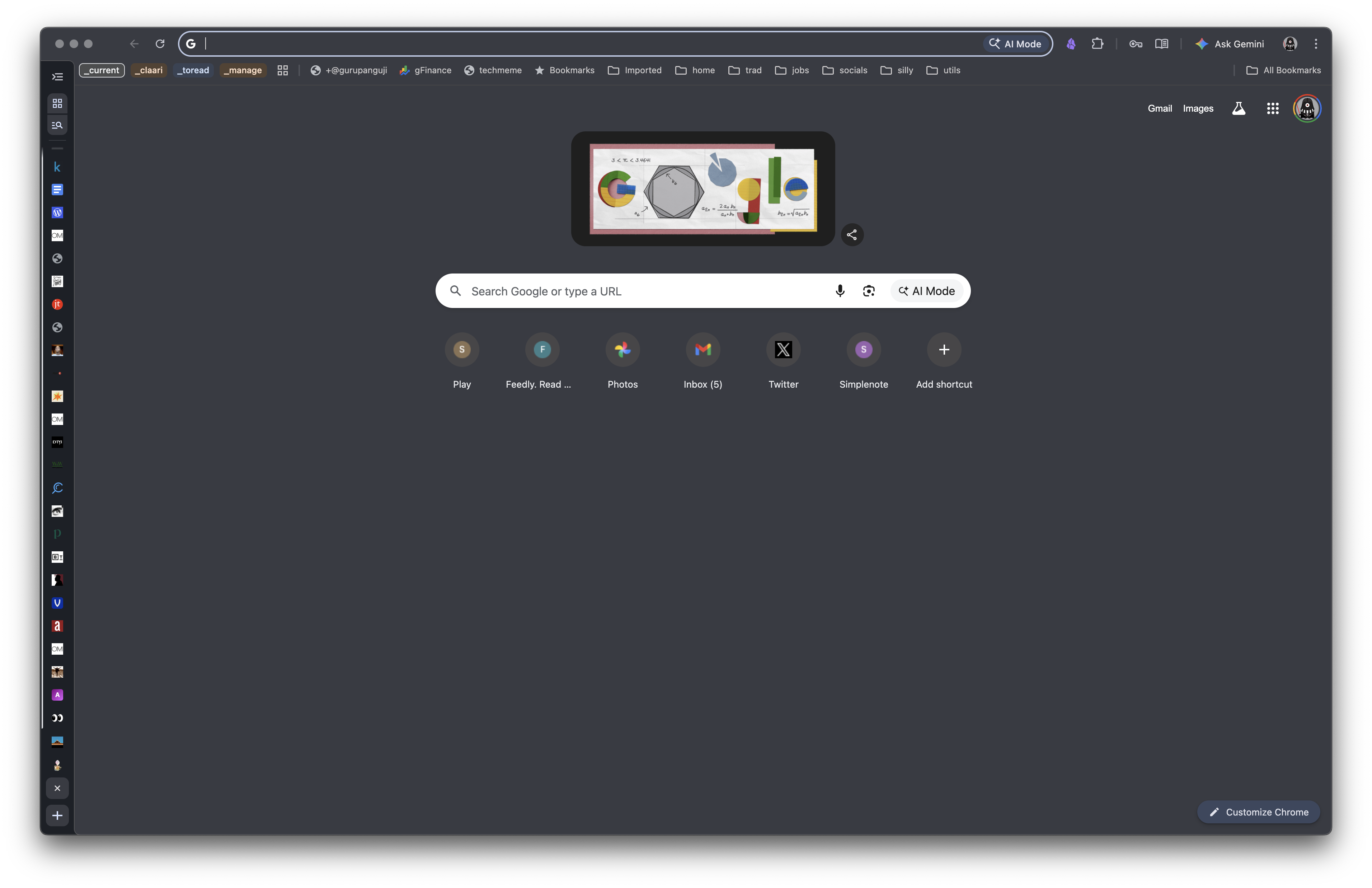
<p>Vertical tabs are now natively supported in Chrome \o/. You still have to enable it under <a href="chrome://flags/#vertical-tabs">chrome://flags/#vertical-tabs</a> and then go to <a href="chrome://settings/appearance">chrome://settings/appearance</a> and toggle 'Tab strip position' to Side. I also think the URL bar and the extensions haven't yet received a finalized position. I am not complaining though - this is solid progress and is still an improvement for those of us that live the <code>vertical-tabs</code> life. </p>
<!-- /wp:paragraph -->

<!-- wp:paragraph -->
<p>The second feature is for those who like command line agents. <a href="https://github.com/ChromeDevTools/chrome-devtools-mcp?tab=readme-ov-file">chrome-devtools-mcp</a> allows your command line agent to directly access your logged in session of chrome. This comes with the caveat: understand the security stance of your machine before entering the <a href="/blog/2025/10/04/what-to-do-about-prompt-injection-attack-surfaces/">lethal trifecta</a>. This is still a big unlock. I am testing out the boundaries and hope to have an update post on the features and the capabilities soon. </p>
<!-- /wp:paragraph -->
